Preserving cherished memories is paramount, especially when those memories are captured in faded, damaged, or otherwise compromised photographs. This comprehensive guide dives into the fascinating world of AI-powered photo restoration, offering a step-by-step approach to revitalizing your precious images. From understanding the fundamental principles of AI restoration to choosing the right tools and troubleshooting common issues, we’ll explore the entire process, ensuring your historical photos remain vibrant and accessible for generations to come.
The increasing sophistication of AI algorithms has opened up unprecedented possibilities for restoring and enhancing old photographs. This guide will not only walk you through the technical aspects but also empower you to make informed decisions, maximizing the quality and aesthetic integrity of your restored images. We will cover the key considerations for selecting restoration tools, preparing your images, and understanding the different AI techniques used.
Ultimately, you will be equipped with the knowledge and practical skills to tackle any photo restoration challenge with confidence.
Introduction to Photo Restoration with AI
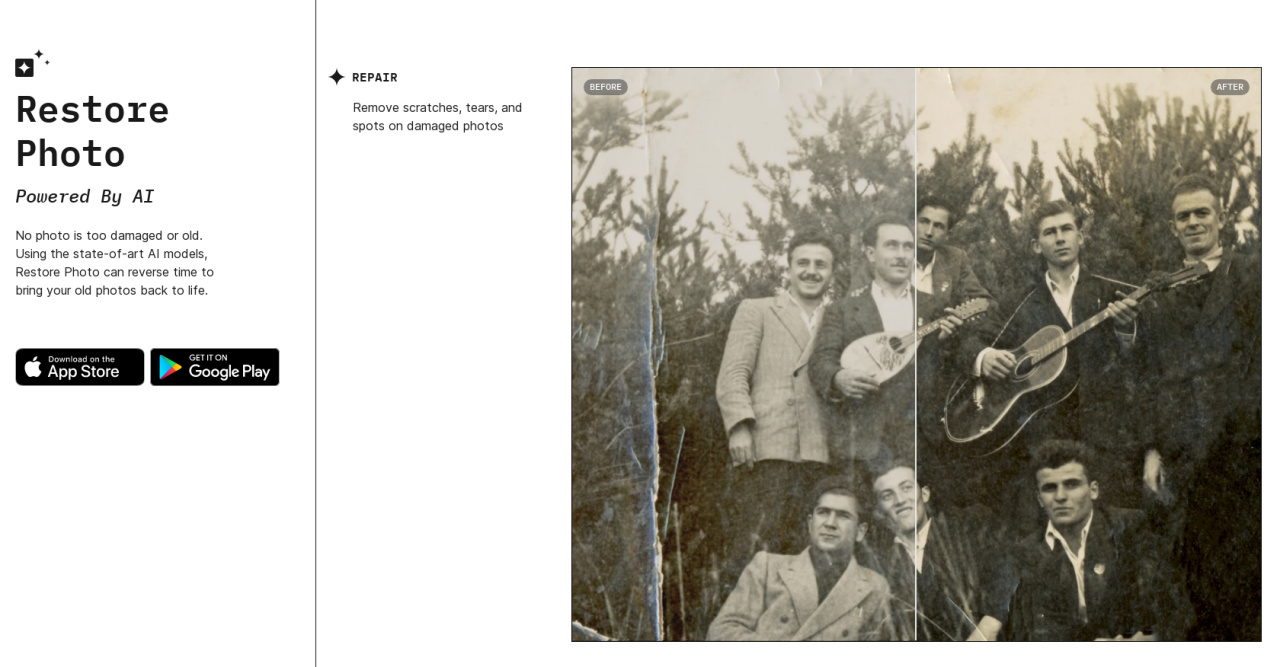
AI-powered photo restoration is revolutionizing the way we preserve and enhance cherished images. By leveraging the power of machine learning algorithms, these tools can effectively address a range of damage, from minor scratches to significant deterioration, offering a powerful alternative to traditional methods. This approach promises unparalleled speed and accuracy in restoring historical photographs and preserving precious family memories.AI photo restoration relies on sophisticated image processing techniques combined with deep learning models.
These models are trained on vast datasets of images, enabling them to learn patterns and relationships within the data. This learned knowledge allows the algorithms to identify and correct damage in new images with remarkable precision. The process often involves reconstructing missing details and adjusting colors and textures to achieve a realistic and aesthetically pleasing result.
AI-Powered Photo Restoration Techniques
AI-powered photo restoration techniques leverage deep learning models trained on extensive image datasets. These models are capable of identifying and correcting various types of damage, effectively mimicking the process of skilled human restoration artists, but with significantly enhanced speed and efficiency. The models learn to recognize patterns and relationships within the data, enabling them to predict missing details and refine existing elements to restore the original image’s quality.
Types of Damage AI Can Repair
AI can address a diverse range of photographic damages. This includes scratches, tears, faded colors, blurriness, and even the removal of unwanted objects or individuals. By analyzing the surrounding context and utilizing pattern recognition, AI can effectively fill in missing pixels, restoring the image to its former glory. In cases of faded colors, the algorithm can adjust the color balance and saturation to achieve a more vibrant and natural result.
These capabilities are crucial for preserving historical images, which often suffer from age-related deterioration.
Historical Perspective on Photo Restoration
Traditional photo restoration methods often relied on manual techniques, demanding considerable time and expertise. Techniques such as using retouching tools, careful blending, and meticulous color correction were employed, often requiring extensive time and dedication. The process was highly subjective, depending on the skill and experience of the restorer. Contrastingly, AI-powered methods offer a far more efficient and objective approach.
The use of algorithms ensures consistency and reproducibility, while also enabling restoration on a larger scale.
Comparison of Manual and AI-Based Restoration Methods
| Feature | Manual Restoration | AI-Based Restoration |
|---|---|---|
| Speed | Time-consuming, potentially weeks or months for complex restorations | Fast, often completing restorations in minutes or hours |
| Accuracy | Highly dependent on the skill of the restorer, potentially introducing inconsistencies | High accuracy through pattern recognition and machine learning |
| User-friendliness | Requires specialized knowledge and skills | Generally user-friendly, often with intuitive interfaces |
The table above highlights the key differences between manual and AI-based restoration methods. AI approaches significantly reduce the time required for restoration, while maintaining a high degree of accuracy and making the process more accessible to a wider audience.
Choosing the Right AI Photo Restoration Tool
Selecting the appropriate AI-powered photo restoration tool is crucial for achieving optimal results. Different tools cater to various needs and skill levels, from basic users to professional photo editors. Understanding the available options and their specific strengths and weaknesses will empower you to make an informed decision.Choosing the right tool hinges on several key factors, including user interface, available features, pricing structure, and compatibility with your file formats.
A user-friendly interface will make the restoration process more intuitive, while comprehensive features can tackle complex damage scenarios. Pricing considerations, ranging from free options to paid subscriptions, should be aligned with your budget and anticipated usage. Lastly, the supported file formats ensure seamless integration with your existing photo collection.
Popular AI Photo Restoration Software and Online Platforms
Numerous platforms offer AI-powered photo restoration services, catering to diverse user requirements. These platforms include dedicated photo editing software, online image editors, and specialized AI restoration tools. Examples include Adobe Photoshop with AI features, online services like Photopea, and dedicated AI photo restoration platforms. Each platform possesses unique strengths, and their selection depends on individual needs and priorities.
Factors to Consider When Selecting a Tool
Several factors are crucial in evaluating AI photo restoration tools. Ease of use, the extent of features, pricing models, and compatibility with various file formats are all important considerations. A user-friendly interface simplifies the restoration process, while a wide range of features can address various damage types and levels. The pricing model, from free to paid subscriptions, should align with your budget.
Lastly, the tool’s compatibility with your file formats ensures a smooth workflow.
Comparison of AI Photo Restoration Tools
| Tool | Pros | Cons |
|---|---|---|
| Adobe Photoshop (with AI features) | Powerful editing capabilities, high-quality results, extensive features for professional users. | Steep learning curve, expensive subscription model. |
| Photopea (online) | Free to use, web-based access, accessible across various devices. | Limited features compared to dedicated software, might not handle the most complex restoration tasks. |
| PhotoAI (example) | Specializes in AI photo restoration, potentially offering advanced algorithms for precise restoration. | Pricing may vary depending on the chosen plan, may not be as user-friendly as general-purpose editors. |
This table provides a concise overview of some common options. The pros and cons are not exhaustive, and individual experiences may vary.
Capabilities for Handling Various Image Types and Damage Levels
Different AI photo restoration tools possess varying capabilities in handling diverse image types and damage levels. Some tools excel in restoring faded or damaged historical photos, while others are better suited for color correction and detail enhancement in modern images. The choice of tool should align with the specific characteristics of the images you intend to restore. Consider the level of damage, the image format, and the desired outcome when making your selection.
For instance, a tool designed for faded historical photos might not be the best choice for fixing minor scratches in a recent digital photo.
Free and Paid Options
- Free Options: Platforms like Photopea provide free online access to basic photo restoration features. These options are ideal for occasional users or those seeking a low-cost solution. Free trials or limited-feature versions are also prevalent. These platforms might be more restrictive in terms of advanced features and output quality compared to paid options.
- Paid Options: Specialized AI photo restoration software, such as those from dedicated providers, often offer a wider range of features and advanced algorithms. These options may also include high-quality output, advanced tools for complex damage scenarios, and support for various image formats. The higher price reflects the extensive features and capabilities.
The availability of free and paid options ensures that users can find a solution that fits their budget and technical requirements. The choice depends on individual needs, the scope of the project, and the expected results.
Preparing Damaged Photos for Restoration
![How to Backup and Restore Active Directory 2022 [A Step-by-step Guide]](https://skillbo.web.id/wp-content/uploads/2025/09/backup-and-restore-active-directory.png "How to Backup and Restore Active Directory 2022 [A Step-by-step Guide]")
Proper preparation is crucial for achieving the best possible results when restoring old or damaged photographs using AI. A well-prepared image provides the AI with the clearest possible representation of the original, facilitating a more accurate and effective restoration process. This section details the steps involved in optimizing your images for optimal AI restoration.
Importance of Image Preparation
Thorough image preparation significantly impacts the quality of the restoration. By optimizing the file’s quality and resolution, and preserving metadata, you provide the AI with the necessary information to accurately reconstruct the original image. This careful pre-processing minimizes potential errors and ensures a more faithful reproduction of the original.
Optimizing File Quality and Resolution
Ensuring high-quality images before restoration is paramount. Artifacts, blur, and damage in the original image can be amplified during the restoration process if not addressed beforehand. Utilizing image editing software like Adobe Photoshop or GIMP can help to reduce noise, sharpen details, and improve overall clarity. A higher resolution image will translate into a sharper and more detailed restored image.
For example, a 300 DPI image will offer superior detail compared to a 72 DPI image, crucial for fine print or intricate details.
Preserving Metadata
Metadata, the data about the image itself, often contains crucial information about the original photograph, including date, location, camera settings, and even the photographer’s name. Maintaining this metadata is essential. While AI restoration focuses on the image itself, preserving this context enriches the overall experience and provides historical context for the restored image. This information can be valuable in understanding the image’s history and the circumstances surrounding its creation.
Uploading Photos to Restoration Tools
Uploading photos to restoration tools requires careful consideration of file formats and recommended sizes. Different tools might support various formats. Common formats like JPEG (.jpg) are widely accepted, but some tools might also support PNG (.png) for images with transparency or higher color depth. It’s essential to check the tool’s specifications for supported file types and optimal sizes.
Image dimensions are also critical. While large dimensions may seem desirable, many restoration tools have size limitations to ensure optimal performance. Adjusting the size and resolution to match the tool’s requirements will prevent issues during the restoration process.
Step-by-Step Guide for Image Preparation
- Assess the damage: Examine the image for types of damage (e.g., tears, scratches, discoloration) to determine the level of restoration required. This initial assessment will guide your subsequent preparation steps.
- Use image editing software (optional): If the image has significant noise or blur, use image editing software to reduce noise and enhance clarity. Ensure the edits are minimal and don’t introduce artifacts.
- Adjust the resolution: Increase the resolution of the image, if possible, using image editing software. This is important for fine details. If not possible, use tools that can enhance resolution. The appropriate resolution depends on the intended use of the restored image.
- Save in a supported format: Save the image in a format supported by the AI restoration tool. Check the tool’s specifications to ensure compatibility. Common formats include JPEG (.jpg) and PNG (.png). If the tool has a recommended size, adhere to it.
- Check for metadata: Ensure that relevant metadata (date, location, camera settings, etc.) is intact or saved in the new file, as appropriate.
- Upload the image: Carefully upload the prepared image to the AI restoration tool, following the tool’s instructions.
AI Restoration Techniques and Processes
AI-powered photo restoration leverages sophisticated image processing techniques to revive and enhance damaged or faded photographs. This involves a combination of algorithms and deep learning models that analyze the image, identify areas needing repair, and then intelligently fill in missing or corrupted data. The result is often a remarkably restored image, bringing historical or personal memories back to life.
Core Image Processing Techniques
AI photo restoration employs a range of image processing techniques. These techniques often involve sophisticated algorithms to analyze the image’s pixels and structures. This allows for precise adjustments and restorations to the image. These techniques are crucial for accurately repairing damaged areas and enhancing overall image quality. Critical processes include noise reduction, detail enhancement, and color correction.
Algorithm Identification and Repair of Damaged Areas
AI algorithms are designed to meticulously analyze damaged areas within an image. Sophisticated algorithms identify patterns and structures within the damaged areas, and using learned information, they generate realistic pixel data to fill in the missing or corrupted information. These techniques involve identifying patterns in neighboring pixels, understanding color gradients, and applying contextual information to determine the most likely replacements for damaged areas.
This process often includes the use of deep learning models that have been trained on massive datasets of images, enabling the algorithms to recognize and replicate intricate details and textures.
Deep Learning and Neural Networks
Deep learning and neural networks play a pivotal role in AI photo restoration. These complex systems, trained on vast datasets of images, learn the underlying structures and relationships within images. This learning enables them to predict the missing or damaged pixels with high accuracy. The networks are designed to understand subtle nuances in lighting, color, and textures.
This allows for a more natural and realistic restoration of the image.
Image Enhancement and Color Correction
Image enhancement algorithms play a vital role in improving the overall quality of restored images. These algorithms analyze the image to identify and enhance details that may have been lost due to damage or degradation. For instance, these techniques can sharpen blurred areas, increase contrast, and improve the clarity of the image. Color correction algorithms adjust the color balance and saturation of the image to match the original colors as closely as possible.
This is crucial for maintaining the authenticity and visual appeal of the restored photograph.
Comparison of AI Restoration Techniques
| Technique | Strengths | Weaknesses |
|---|---|---|
| Convolutional Neural Networks (CNNs) | Excellent at recognizing patterns and textures, leading to highly realistic restorations. Effective in handling various types of damage. | Can be computationally intensive, requiring significant processing power and time. Performance can vary depending on the complexity of the damage. |
| Generative Adversarial Networks (GANs) | Exceptional at generating realistic image content, often producing aesthetically pleasing results. Good at filling in missing details and textures. | Can sometimes produce artifacts or inconsistencies in the restored image, especially with complex damage. Training GANs requires substantial computational resources and time. |
| Image Super-resolution Techniques | Effective in increasing the resolution of low-resolution images, restoring details that have been lost due to degradation. Often used in conjunction with other techniques. | May not be as effective for highly damaged or corrupted images. Results can be less convincing if the initial image resolution is very low. |
Troubleshooting and Common Issues
Restoring old and damaged photos with AI can sometimes yield unexpected results. Understanding common issues and how to address them is crucial for achieving satisfactory outcomes. This section will guide you through potential problems and offer solutions for a smoother restoration process.AI photo restoration, while powerful, isn’t infallible. It’s important to approach the process with realistic expectations and be prepared to address any challenges that may arise.
Errors, though infrequent, can occur, and this section will help you identify and correct them effectively.
Identifying Artifacts
Artifacts are unwanted visual elements introduced during the restoration process. These can manifest as noise, blurring, or unnatural color variations. Understanding their causes is key to their resolution. Careful inspection of the restored image is paramount to identifying artifacts. Often, they appear as speckled patterns, or as unnatural gradients or textures.
Addressing Over-Restoration
Over-restoration occurs when the AI attempts to enhance details beyond what’s present in the original image. This can lead to a loss of the photo’s original character and a somewhat unrealistic appearance. The restored image may exhibit an overly sharp, or excessively smooth, texture. The image might also contain details that appear fabricated or unrealistic.
Correcting Unwanted Changes
AI tools can sometimes introduce unwanted changes to color palettes, tones, or textures. The restored image might appear significantly different from the original, with colors that seem misplaced or unrepresentative of the original. Carefully comparing the restored image with the original is crucial to spot such issues.
Strategies for Saving Partially Restored Images
Sometimes, a restoration process might be interrupted or produce unsatisfactory results. Saving intermediate steps or copies of the image is a critical measure for maintaining the original quality. Creating backups at various stages of the restoration is crucial for recovery.
Troubleshooting Specific Software
Different AI photo restoration software has unique functionalities and limitations. Familiarizing yourself with the specific tools and features of the software you use is critical. This allows for more precise troubleshooting when issues arise.
| Software | Troubleshooting Tip |
|---|---|
| Photopea | Check the “Advanced” options for specific restoration settings. Adjusting the detail level or sharpness might address artifacts. |
| Adobe Photoshop | Use the “Content-Aware Fill” tool cautiously. This tool can sometimes introduce unwanted effects. |
| Luminar AI | Adjust the “Noise Reduction” and “Sharpening” sliders to find the optimal balance. |
Examples of Common Errors and How to Avoid Them
A common error is using a low-quality input image for restoration. This results in artifacts and an overall unsatisfactory outcome. Ensure your original image is of sufficient quality to permit accurate restoration. Another common error is applying too much sharpening, leading to an overly artificial look. Gradually increase the sharpening level to minimize unintended over-sharpening.
Applying inappropriate color adjustments can lead to unnatural colors. Check the original photo’s color palette for accurate restoration. Remember that the goal is to preserve the original essence of the photo.
Optimizing Results and Fine-Tuning
Achieving the best possible results in photo restoration requires a meticulous approach beyond simply applying AI tools. Fine-tuning allows users to tailor the restoration process to their specific needs and preferences, preserving the essence of the original image while addressing imperfections effectively. This stage is crucial for achieving a natural and aesthetically pleasing outcome.AI restoration tools often offer a range of parameters that can be adjusted to control the intensity and style of the restoration.
Understanding how to manipulate these settings is key to achieving the desired level of detail and visual appeal. This section provides a comprehensive guide to optimizing your restoration efforts.
Adjusting Parameters for Specific Outcomes
Fine-tuning the AI restoration process involves adjusting various parameters within the software. Different tools employ different terminology, but common adjustments include sharpness, contrast, color saturation, and noise reduction levels. Carefully adjusting these settings allows for a more controlled and personalized restoration. Understanding the impact of each adjustment is vital for achieving the desired result. For example, increasing sharpness might enhance detail but could also introduce artifacts if not managed appropriately.
Controlling the Level of Restoration
Maintaining the original aesthetic of the image is paramount. Excessively aggressive restoration can result in an unnatural or artificial appearance, diminishing the historical or artistic value of the photograph. AI tools typically offer options to control the level of restoration, ranging from subtle enhancements to more substantial transformations. Careful evaluation at each stage is essential to avoid over-restoration.
Evaluating the Restoration Process at Each Stage
Regular evaluation throughout the restoration process is critical. This involves visually inspecting the image at various points to assess the effect of each adjustment. This iterative approach allows for continuous refinement and ensures the restoration remains true to the original while addressing imperfections. This step-by-step approach allows for continuous refinement, ensuring the desired balance between detail and naturalness is maintained.
Step-by-Step Fine-Tuning Procedure
This procedure Artikels a systematic approach for fine-tuning a restoration:
- Initial Assessment: Begin by carefully examining the original image and identifying specific areas needing restoration. This preliminary step will help to focus the fine-tuning process. Note the areas with damage and the type of damage. Is it fading, tearing, or other types of damage?
- Initial Restoration: Apply the AI restoration tool’s default settings to the image. This provides a baseline for comparison and allows you to observe the initial results. Be mindful of the software’s default settings and the potential impact they have on the image.
- Parameter Adjustment: Gradually adjust the parameters such as sharpness, contrast, color saturation, and noise reduction, incrementally. Observe the effects on the image after each adjustment. Note the changes and their impact on the image.
- Iterative Evaluation: Continuously evaluate the image at each stage. Compare the current restoration with the original and previous versions. This iterative process allows you to make informed decisions about further adjustments. Consider the original image’s overall aesthetic and strive for a balance between restoration and preservation.
- Final Refinement: Make subtle adjustments to fine-tune the restoration. Focus on areas that require further enhancement. This may involve adjusting the parameters for specific areas to create a more natural appearance. Focus on ensuring the restoration aligns with the overall aesthetic.
Preserving and Sharing Restored Images
Preserving the fruits of your AI photo restoration efforts is crucial. Proper storage and sharing strategies ensure your restored images remain accessible and maintain their quality over time. This section Artikels best practices for saving, archiving, and distributing your restored digital masterpieces.Choosing appropriate file formats and resolutions is paramount to long-term image preservation and optimal sharing. Careful consideration of these factors ensures the quality of your restored images is maintained, and they can be easily viewed and shared across various platforms.
File Formats for Saving Restored Photos
Selecting the right file format is vital for preserving the quality and usability of your restored images. Different formats cater to varying needs, from online display to high-resolution printing. Consider factors like compression levels, image quality, and intended use when making your choice.
- JPEG (Joint Photographic Experts Group): A widely used format, JPEG offers good compression, making it ideal for web use and sharing. However, repeated saving can degrade image quality. Use this format for images intended for online viewing, email, or social media.
- PNG (Portable Network Graphics): PNG is a lossless format, retaining all image data. This format is excellent for graphics with sharp lines, text, and images that need to maintain their quality. Use this format for images requiring high detail or where quality is critical.
- TIFF (Tagged Image File Format): TIFF is a lossless format known for its large file size. It is ideal for professional-grade images requiring high quality and detail, especially for printing. Consider this format for archiving purposes and high-resolution prints.
- HEIC (High Efficiency Image Container): A modern format that offers excellent compression without compromising quality. This format is suitable for both online and offline use.
Resolutions for Saving Restored Photos
The resolution of your restored image directly impacts its visual quality and suitability for various purposes. High resolutions are essential for large prints, while lower resolutions are suitable for web display.
- Web Images: Resolutions around 72 pixels per inch (PPI) are suitable for displaying images on websites or screens. This balance image quality with file size, enabling faster loading times.
- Prints: For high-quality prints, resolutions of 300 PPI or higher are recommended. This ensures sharp details and clarity in printed outputs.
- Archiving: For long-term archiving, high resolutions (300 PPI or higher) are ideal for ensuring the image retains its clarity and details.
Archiving Restored Images for Long-Term Preservation
A robust archiving strategy safeguards your restored images against loss and degradation over time.
- Multiple Backups: Creating multiple backups in different locations protects against data loss due to hardware failure or other issues. This ensures you have copies of your images even if one storage location is compromised.
- Cloud Storage: Cloud storage services provide a secure and accessible way to back up and store your images. These services often offer robust redundancy and security features.
- External Hard Drives: External hard drives provide a reliable offline backup solution. Regularly backing up to external drives safeguards your images from potential data loss.
- Physical Archives: For archival purposes, consider using physical storage media like archival-quality CDs or DVDs. These are good for long-term storage, though they need regular maintenance.
Sharing Restored Images Digitally
Sharing your restored images digitally involves selecting appropriate formats and considering the recipient’s needs.
- High-Quality Sharing: For sharing restored images with high fidelity, TIFF and PNG formats are recommended. These formats maintain the highest image quality and are well-suited for professional-grade sharing.
- Web Sharing: JPEG is the best format for sharing images online. It provides a balance of quality and file size, which is critical for faster loading times on websites and social media platforms.
Exporting Images in Various Formats
This section provides options for exporting restored images in various formats, catering to different needs and applications.
- JPEG: Most image editing software provides options for exporting images in JPEG format. This format is well-suited for sharing online and on social media platforms.
- PNG: Exporting in PNG format preserves image quality, ensuring that sharp lines and detailed elements are retained.
- TIFF: Exporting in TIFF format provides high-resolution images, ideal for printing and archiving.
- HEIC: Some image editing software supports HEIC format. This format is suitable for storing images efficiently without sacrificing quality.
Summary of File Formats
The table below summarizes the suitability of various file formats for different use cases.
| File Format | Suitability | Use Cases |
|---|---|---|
| JPEG | Web display, social media | Online sharing, email |
| PNG | Web display, graphics | Web images, logos, illustrations |
| TIFF | High-quality printing, archiving | Professional prints, long-term storage |
| HEIC | Efficient storage, online use | Web sharing, mobile devices |
Final Review
In conclusion, this guide has explored the transformative potential of AI in restoring and enhancing old and damaged photographs. By understanding the principles, selecting the appropriate tools, and following the provided steps, you can successfully revitalize your precious memories. The journey of restoring these images is not just about technical proficiency, but also about appreciating the historical context and emotional value they hold.
We hope this comprehensive guide empowers you to preserve these irreplaceable treasures for years to come.