Unlocking the power of audio and video content is now easier than ever with AI-powered transcription. This comprehensive guide provides a step-by-step approach to transcribing various audio and video files using AI, from choosing the right tool to handling specific formats and ensuring data security. We will delve into the intricacies of automated transcription, examining the different applications and the advantages over manual methods.
This guide is designed to empower users with the knowledge and tools needed to effectively transcribe audio and video, whether for personal or professional use.
The guide covers a wide range of essential topics, including the selection of appropriate AI transcription tools, preparation of files for optimal results, using the software effectively, enhancing transcription accuracy, and handling post-processing. Furthermore, the guide addresses crucial aspects like data security and privacy, while also examining future trends in AI transcription. This detailed exploration equips users with the practical skills needed to navigate the complexities of AI-driven transcription.
Introduction to Audio and Video Transcription with AI
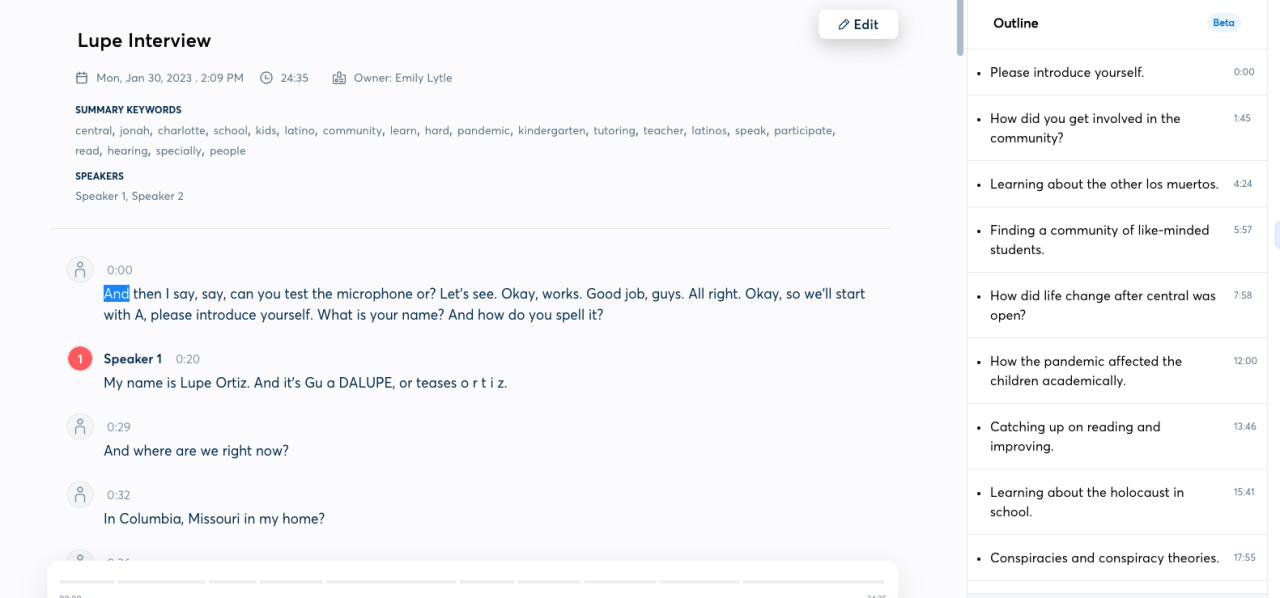
Automated transcription, powered by artificial intelligence, has revolutionized the way we process audio and video data. This technology converts spoken language into written text, enabling efficient access and analysis of information previously locked within sound and moving images. The accuracy and speed of AI-driven transcription have significantly impacted various industries, from media production to legal proceedings.AI transcription utilizes sophisticated algorithms to identify and transcribe speech from audio and video files.
These algorithms analyze audio waveforms, identify patterns in sound corresponding to spoken words, and then convert them into text. The process often involves speech recognition, natural language processing, and advanced machine learning models.
Overview of Automated Transcription Methods
Various methods contribute to the efficiency of AI-powered transcription. Acoustic modeling is crucial, as it enables the system to distinguish between different sounds and spoken words. Natural language processing (NLP) plays a vital role in understanding the context and meaning of the transcribed text, often improving accuracy by interpreting nuances in speech. Machine learning algorithms, continuously trained on vast datasets, further enhance the system’s ability to adapt to diverse accents, dialects, and speaking styles.
Types of Audio and Video Files Transcribable by AI
AI-based transcription systems can process a wide range of audio and video files. This includes interviews, lectures, podcasts, meetings, and even phone calls. The quality of the audio or video source, including background noise, and the clarity of the speech, will impact the accuracy of the transcription. Additionally, formats like MP3, WAV, and MP4 are commonly supported.
The systems can adapt to different speaking speeds, accents, and even overlapping speech, although accuracy may vary in complex scenarios.
Applications of Audio and Video Transcription Using AI
The applications of AI-powered transcription extend across numerous fields. In education, it allows for the creation of transcripts of lectures and discussions for students to review and learn from. Businesses can use it to quickly document meetings, summarize discussions, and generate reports. In the legal field, transcriptions of interviews and court hearings are vital for record-keeping and analysis.
The entertainment industry utilizes it for creating subtitles and transcripts for films and TV shows. Moreover, healthcare professionals use transcriptions to document patient interactions, improving patient care.
Comparison of Manual vs. AI-Powered Transcription
| Feature | Manual Transcription | AI-Powered Transcription |
|---|---|---|
| Speed | Time-consuming, often requiring hours or days for substantial amounts of audio/video | Fast, often transcribing hours of audio/video in minutes |
| Accuracy | High accuracy with careful attention to detail; human error is possible | High accuracy, but may require human review to correct errors; ongoing improvements |
| Cost | Expensive, requiring trained personnel and significant time investment | Generally more cost-effective for large volumes of audio/video |
| Scalability | Limited scalability, challenging to handle large projects | Highly scalable, ideal for large-scale projects and data volumes |
| Human Review | Essential for quality control and error correction | Often requires human review, but for significantly smaller percentage of total content |
Choosing the Right AI Transcription Tool
Selecting the optimal AI transcription tool is crucial for accurate and efficient audio and video processing. The plethora of available options necessitates careful consideration of features, pricing, and user needs. Different tools cater to varying requirements, from simple recordings to complex multimedia projects. This section will guide you through popular choices, comparing their functionalities and pricing models to assist you in making an informed decision.Various factors influence the selection of a transcription service.
These include the volume of audio/video files to be processed, the desired level of accuracy, the type of content, and the budget. Understanding these considerations empowers users to make an informed decision that aligns with their specific needs and resources.
Popular AI-Powered Transcription Services
A range of reputable services provide AI-powered transcription capabilities. Familiarizing yourself with these tools can streamline your selection process. Notable examples include Google Cloud Speech-to-Text, Amazon Transcribe, Otter.ai, Descript, and Trint. These platforms offer varying degrees of sophistication and pricing models.
Features and Functionalities of Different Transcription Tools
Different transcription services provide diverse functionalities. Some tools are designed for basic transcription, while others offer advanced features such as speaker identification, noise reduction, and real-time transcription.
- Google Cloud Speech-to-Text excels in accuracy and speed, making it a reliable choice for diverse transcription needs. It is well-suited for large-scale projects and offers a wide range of language support.
- Amazon Transcribe is known for its robust features, particularly in handling complex audio environments. Its integration with other Amazon Web Services (AWS) services enhances flexibility.
- Otter.ai is a popular choice for real-time transcription, frequently used for meetings and conferences. Its focus on ease of use and integration with collaboration tools makes it a convenient solution.
- Descript is a comprehensive platform for audio and video editing. Its integration of transcription, editing, and collaboration tools makes it ideal for post-production tasks.
- Trint stands out for its focus on accuracy and accessibility. It provides a user-friendly interface and integrates with various platforms, streamlining workflow.
Pricing Models and Subscription Options
Pricing models for AI transcription services vary considerably. Understanding the different subscription options and tiers is essential for budget planning. Some platforms offer pay-as-you-go models, while others have tiered subscriptions with varying usage limits and features.
- Google Cloud Speech-to-Text employs a pay-as-you-go model, charging based on the amount of audio/video processed. This allows for scalability and flexibility.
- Amazon Transcribe also uses a pay-as-you-go model, offering competitive pricing based on usage.
- Otter.ai often provides a freemium model, offering a limited set of features for free and higher tiers with additional functionalities.
- Descript offers various subscription tiers, catering to different needs and budgets.
- Trint also offers a range of subscription plans, tailored for individual or team use, often with features scaling with increasing usage needs.
Pros and Cons of Different AI Transcription Software
The following table summarizes the advantages and disadvantages of several AI transcription tools.
| Transcription Tool | Pros | Cons |
|---|---|---|
| Google Cloud Speech-to-Text | High accuracy, extensive language support, scalable pricing | Requires technical setup, less user-friendly interface |
| Amazon Transcribe | Robust features, excellent for complex audio, integrated with AWS ecosystem | Steeper learning curve, potentially higher initial cost |
| Otter.ai | Real-time transcription, user-friendly interface, integration with collaboration tools | Limited accuracy compared to dedicated transcription services, potentially higher cost |
| Descript | Comprehensive editing and collaboration tools, integrated transcription | More expensive, might not be suitable for simple transcription tasks |
| Trint | High accuracy, accessible interface, various integrations | Potentially higher cost compared to some basic services |
Preparing Files for Transcription
Optimizing audio and video files before transcription significantly impacts the accuracy and efficiency of AI-powered tools. Proper preparation ensures the AI model can focus on the spoken content, minimizing errors caused by background noise, poor audio quality, or unexpected file formats. This section details the crucial steps involved in preparing audio and video files for optimal transcription.Careful preparation minimizes the need for post-processing and significantly improves the accuracy of the transcription, leading to better results.
Addressing issues like background noise and poor audio quality upfront prevents errors and saves time in the transcription process.
File Format and Quality
Understanding the file format and ensuring good audio quality are fundamental to successful transcription. Different AI transcription tools may handle various formats with varying degrees of success. Common formats include WAV, MP3, and MP4. Choosing the appropriate format, and verifying the quality of the audio file, will ensure the AI can process the data accurately. Converting files to compatible formats (e.g., WAV for optimal quality) is often beneficial.
Higher bit rates and sample rates usually lead to better audio quality.
Addressing Background Noise and Poor Audio Quality
Background noise is a common challenge in audio transcription. Poor audio quality can also impede the AI’s ability to accurately transcribe the audio. Employing noise reduction software can help mitigate these issues. Tools for noise reduction often allow for fine-tuning and customization of the noise reduction settings, allowing for a more effective process. Adjusting recording levels to ensure clarity and using a quiet recording environment is also crucial.
Step-by-Step Guide for Formatting Audio and Video Files
To ensure optimal transcription, follow these steps for preparing audio and video files:
- Check File Format: Verify that the audio or video file is in a format compatible with the chosen transcription tool. Tools like WAV, FLAC, or M4A often provide better quality than compressed formats like MP3. If necessary, convert the file to a supported format.
- Assess Audio Quality: Listen carefully to the audio for background noise or distorted sounds. Identify any areas with significant background noise, as these might require additional processing to improve the clarity of the audio.
- Apply Noise Reduction (Optional): If background noise is a significant concern, use noise reduction software to minimize its impact. Experiment with different settings to find the best balance between noise reduction and preserving the original audio quality.
- Adjust Recording Levels (If Necessary): Ensure that the audio levels are consistent throughout the recording. If the recording has significant volume fluctuations, use audio editing software to normalize the levels.
- Review and Edit: After completing the previous steps, carefully review the audio file for any remaining issues. If needed, make further adjustments using audio editing software to improve the clarity of the audio. If the source audio has significant distortions or is not suitable for transcription, consider re-recording the audio.
Using AI Transcription Software
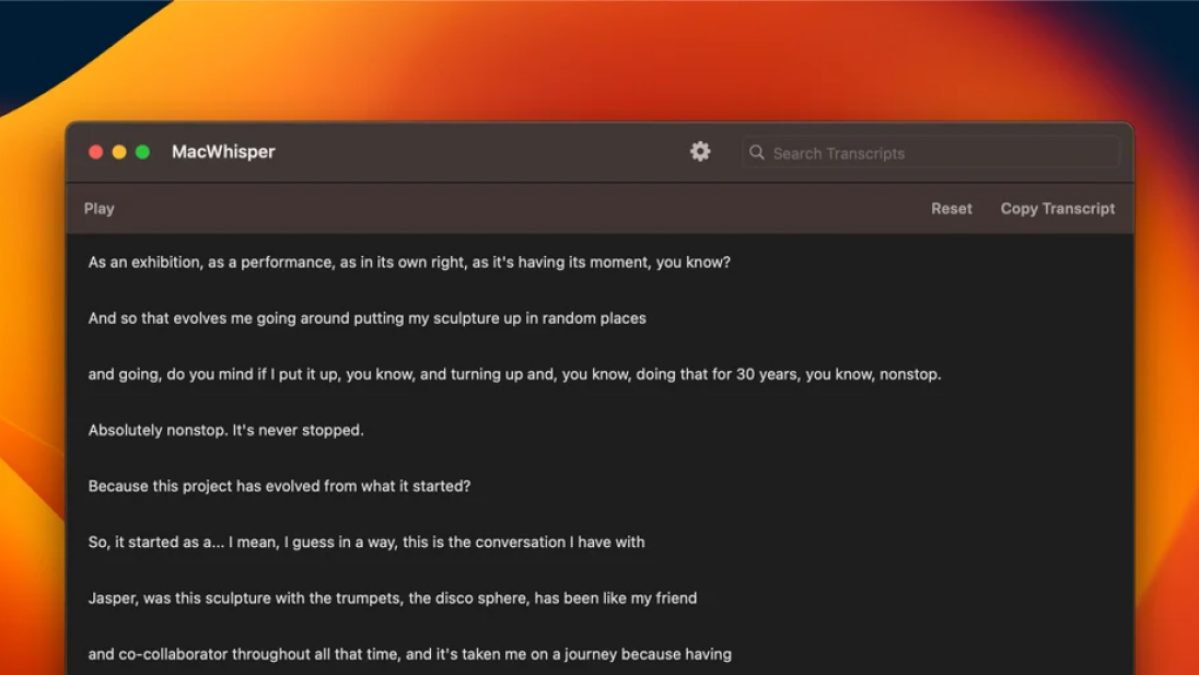
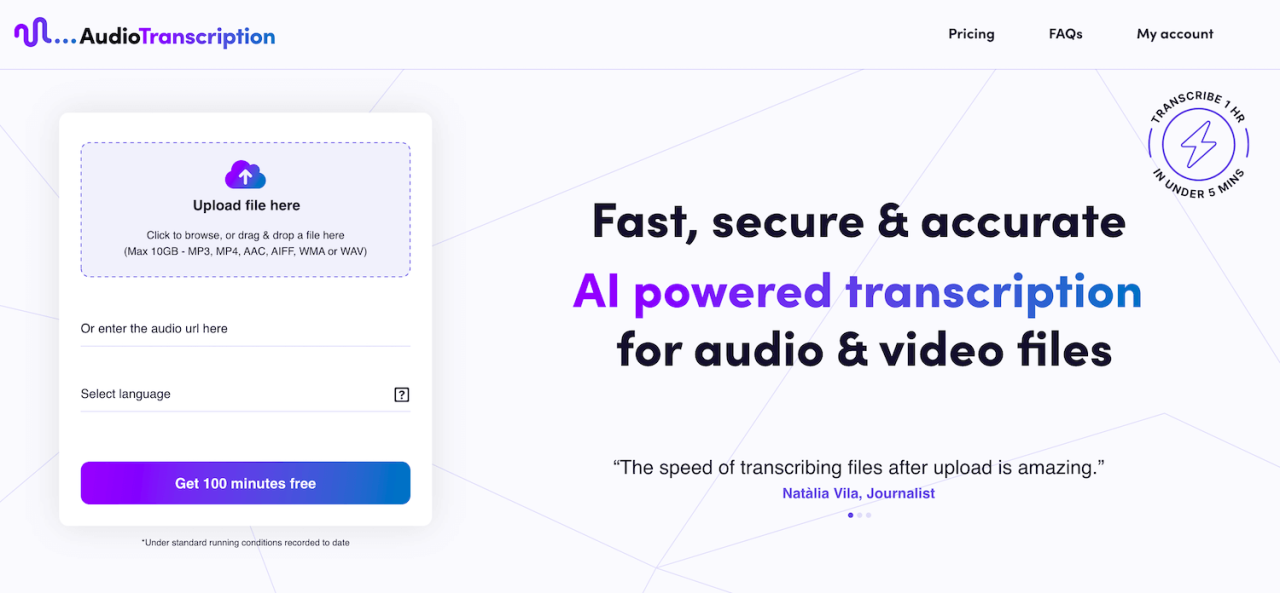
Utilizing AI-powered transcription software streamlines the process of converting audio and video files into text. This section details the typical user interface, upload and transcription workflow, and the various editing and review options. Familiarizing yourself with these aspects will significantly improve your transcription efficiency.
Typical User Interface
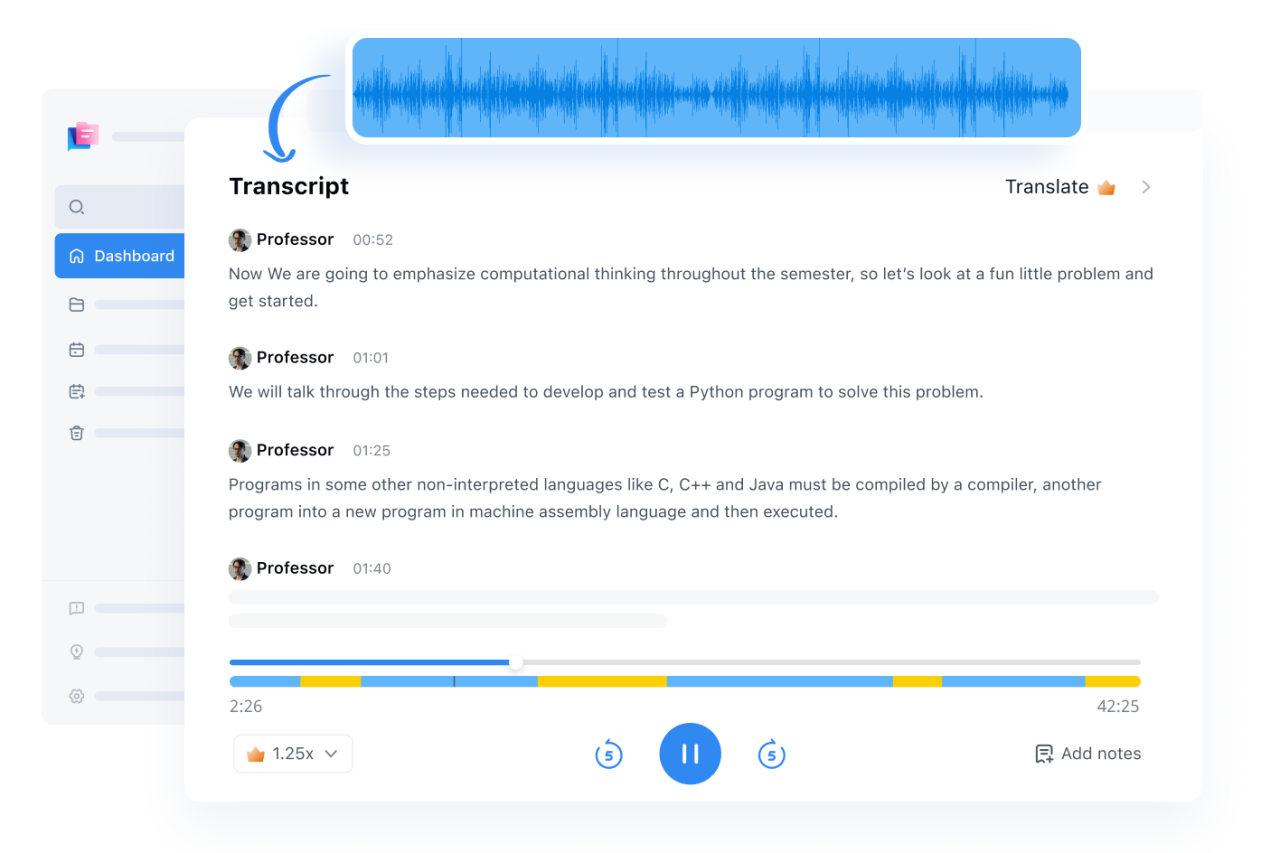
Modern AI transcription software typically features a clean and intuitive interface. The layout often includes a prominent upload area for files, a display for the transcribed text, and a section for managing settings and options. Tools for navigation, such as playback controls and timestamps, are also commonly present. Many platforms offer customizable themes and layouts, allowing users to personalize their experience.
Upload and Transcription Process
The upload and transcription process is generally straightforward. Users typically select the audio or video file to be transcribed from their computer. The software then automatically begins the transcription process, converting the audio or video content into text in real-time. The progress of the transcription can be monitored through a progress bar or a similar visual indicator.
Editing and Review Options
AI transcription software provides a range of editing and review tools to refine the output. These often include options for correcting errors, such as misspellings or inaccuracies in the transcribed text. Advanced tools allow for the insertion of speaker tags, and the addition or removal of sections of the transcription. Users may also be able to adjust the speed or other parameters to fine-tune the quality of the output.
Settings and Options
- Language Detection: Most AI transcription tools automatically detect the language of the audio or video file. However, users can manually select the language if needed, enhancing accuracy.
- Speaker Identification: Some software allows for speaker identification, which assigns different identifiers (like names or labels) to speakers in the audio file, making it easier to manage multiple speakers.
- Output Format: Options usually exist for exporting the transcribed text in various formats, such as .txt, .docx, or .pdf.
- Accuracy Settings: Some platforms offer the ability to adjust the accuracy of the transcription. Higher accuracy may result in a longer processing time.
- Transcription Speed: The speed of the transcription is often adjustable, impacting the processing time and quality. Users might prefer a faster speed for rough drafts, or a slower speed for high-accuracy results.
| Setting | Description | Impact |
|---|---|---|
| Language Detection | Automatically identifies the language of the audio. | Reduces manual effort, improves initial accuracy. |
| Speaker Identification | Identifies and distinguishes between speakers. | Enables clear differentiation and organization of dialogue. |
| Output Format | Specifies the format for the transcribed text. | Facilitates seamless integration with other applications and workflows. |
| Accuracy Settings | Adjusts the trade-off between speed and accuracy. | Higher accuracy may require more processing time. |
| Transcription Speed | Controls the processing speed. | Faster speeds often mean less accurate results. |
Enhancing Transcription Accuracy
AI transcription tools have significantly improved accuracy, but achieving perfect results still requires careful consideration and strategic intervention. Understanding the nuances of audio and video recordings, and the limitations of the AI models, allows users to maximize the utility of the transcribed output. This section will delve into strategies for enhancing the accuracy of AI-generated transcriptions, addressing crucial factors like speaker identification, dialect recognition, and handling complex audio scenarios.Speaker identification and dialect recognition play a critical role in transcription accuracy.
AI models often struggle with multiple speakers, overlapping voices, or accents. These challenges can lead to errors in identifying the speaker or misinterpreting the spoken words. Strategies for improving accuracy in these scenarios will be explored in detail.
Speaker Identification and Dialect Recognition
Accurate speaker identification is vital for transcriptions with multiple speakers. Transcription software frequently struggles with overlapping speech or indistinct audio, leading to incorrect attributions of spoken phrases. This is particularly relevant in meetings, interviews, or group discussions where multiple people are speaking simultaneously. Similarly, dialects or accents can cause misinterpretations, leading to errors in the transcription output.
Sophisticated algorithms that analyze audio features like pitch, rhythm, and volume can aid in identifying and separating speakers, thus enhancing the overall accuracy of the transcription.
Handling Complex Audio and Video Situations
Complex audio and video recordings often present challenges for AI transcription software. Issues such as background noise, poor audio quality, or speaker mumbling can significantly reduce accuracy. Careful consideration of the audio recording environment is crucial in optimizing transcription quality. Techniques for mitigating these factors and strategies for handling such situations will be examined.
Strategies to Improve Accuracy
Proper preparation of the audio/video files for transcription is paramount. Reducing background noise, ensuring clear audio quality, and using high-quality microphones are crucial steps in the process.
- Clear Audio Quality: Ensure the audio recording is free from background noise or distortion. Use high-quality microphones and adjust audio levels to optimize signal clarity. This step minimizes errors caused by audio quality issues.
- Speaker Separation: For recordings with multiple speakers, consider using tools to separate the audio streams. Software designed for audio editing can be useful in isolating individual speakers and improving clarity for transcription. Careful editing can enhance the quality of transcription.
- Review and Edit: Always review the generated transcription. Even with advanced AI models, human review is essential to correct errors, identify misinterpretations, and ensure the final product is accurate and reliable. This step is critical to guarantee the final output meets the desired standards of quality.
- Using Transcription Tools with Speaker Recognition: Modern transcription tools often incorporate speaker recognition capabilities. Choose tools that support this feature for increased accuracy, particularly when multiple speakers are involved.
- Consideration of Audio Complexity: Analyze the complexity of the audio input. Factors such as background noise, overlapping speech, and the number of speakers impact the accuracy of the transcription. Recognize the potential for error in complex audio recordings and adopt strategies to minimize these issues.
Editing and Post-Processing Transcriptions
AI transcription tools provide remarkably accurate results, but human review and editing are essential for optimal quality. This stage ensures the final product is error-free, consistent with the original audio or video, and ready for use in various applications. Thorough editing significantly improves the reliability and usability of the transcribed data.
Proofreading and Error Correction
AI transcriptions, while highly accurate, can occasionally contain errors. These errors can range from simple typos to more significant misinterpretations of spoken words or phrases. Careful proofreading and correction are crucial to maintaining the integrity and clarity of the transcribed text. Identifying and rectifying these errors ensures the final product accurately reflects the intended message.
Organizing and Managing Transcribed Data
Effective organization of transcribed data is paramount for easy retrieval and future use. A well-structured system simplifies searching, filtering, and managing large volumes of transcriptions.
- File Naming Conventions: Consistent and descriptive file naming conventions are essential for efficient organization. For example, using a consistent format like “Meeting_2024-10-27_Sales_Team.txt” allows for quick identification and retrieval of specific transcriptions.
- Folder Structure: A hierarchical folder structure, mirroring the organization of the original recordings or associated projects, facilitates easy navigation and retrieval of files. This could include folders for individual projects, meetings, or specific departments.
- Metadata: Adding metadata, such as date, time, speaker, and subject, enhances searchability and context. This crucial information allows for efficient filtering and analysis.
Enhancing and Refining Transcriptions
Beyond simple error correction, further refinement can enhance the usability and quality of transcriptions. Techniques beyond basic proofreading can significantly improve the output.
- Speaker Identification: Identifying speakers and adding speaker tags (e.g., “John Smith,” “Jane Doe”) can improve the readability and understanding of complex discussions. This is particularly helpful in meetings or interviews with multiple participants.
- Formatting and Style: Applying formatting (e.g., bolding, italics, bullet points) to highlight important information or s can improve readability. This enhancement is useful for reports, summaries, or articles.
- Adding Contextual Information: Adding contextual information, like background noise or interruptions, can help clarify unclear passages. This is beneficial for situations where the audio is not perfectly clear. For example, noting a speaker’s cough or an overlapping conversation, can add nuance to the transcription.
- Using Specialized Tools: Specific software or online tools can aid in tasks such as speech-to-text conversion, automatic speaker identification, and noise reduction. These tools can significantly enhance the accuracy and quality of the transcription process.
Tools and Techniques for Enhancing Accuracy
Various tools and techniques can be used to enhance the accuracy and quality of transcriptions.
- Grammar and Spelling Checkers: Using grammar and spelling checkers can help to identify and correct errors in transcriptions. These tools are useful in ensuring the final output meets professional standards. These checkers should be used as an aid, not a replacement for human review.
- Automated Tools: Automated tools such as noise reduction software and speaker identification software can enhance the accuracy of transcriptions. These automated tools provide a strong foundation, but manual review is still crucial.
- Human Review and Editing: Human review and editing remain essential to ensure the accuracy and quality of the final transcription. A combination of automated tools and human review often yields the best results.
Integration with Other Tools
AI transcription, a powerful tool for processing spoken content, seamlessly integrates with a wide range of productivity applications. This integration significantly streamlines workflows, enabling users to leverage transcribed data for various tasks, from content creation to research and analysis. By connecting transcription services to existing systems, professionals can unlock new levels of efficiency and productivity.
Integration with Content Creation Tools
AI transcription plays a pivotal role in content creation, enabling efficient and effective production of various formats. Transcribed audio and video can be readily incorporated into blog posts, articles, scripts, and presentations. This significantly reduces the time required for manual typing, allowing creators to focus on refining and enriching the content.
- Transcription into Blog Posts and Articles: Transcribed audio or video can be easily edited and formatted to suit the needs of the blog or article. This allows for quick creation of high-quality content from recorded interviews, presentations, or discussions.
- Script Creation: Transcribing audio or video recordings of meetings, interviews, or lectures facilitates the rapid creation of detailed scripts for presentations, speeches, or other performances. This streamlines the script development process.
- Podcast Production: Transcribed content can be used for generating show notes, episode summaries, and detailed descriptions, making podcast production more efficient.
- Video Production: Transcription enables the creation of accurate and detailed captions and subtitles, enhancing accessibility and viewer engagement for video content.
Integration with Research Tools
Transcription allows for more efficient research by enabling easier extraction of key information from audio and video data. This is particularly useful for academic research, market analysis, and any other field requiring detailed data extraction.
- Academic Research: Transcribing lectures, seminars, or interviews allows for comprehensive analysis of complex topics and ideas. This detailed data can facilitate deeper insights and more effective research outcomes.
- Market Research: Transcribing focus groups or customer feedback sessions enables detailed analysis of consumer opinions, preferences, and needs. This aids in informed business decisions.
- Data Analysis: Transcribed data can be readily imported into spreadsheet programs for statistical analysis. This allows for the extraction of quantifiable data and patterns from recordings, furthering the insights gleaned from the research.
Integration into Existing Workflows
Integrating AI transcription into existing workflows is relatively straightforward. Many transcription services offer APIs and integrations with popular productivity software. This allows for seamless data transfer and automated processing.
- Workflow Automation: Using APIs, transcription can be integrated into existing workflows, automating the transcription process and reducing manual effort.
- Automated Data Extraction: Data extracted from transcribed content can be automatically fed into other applications, facilitating seamless information flow.
- Customization: Many transcription services allow customization of integration settings, enabling users to tailor the process to their specific needs.
Example Integrations
| Integration | Description | Benefits |
|---|---|---|
| Transcription with Google Workspace | Transcription results can be directly integrated into Google Docs, Sheets, or Slides, facilitating seamless workflow. | Improved efficiency in document creation and data analysis. |
| Transcription with CRM Systems | Transcription of customer interactions (calls, emails, or video chats) can be automatically imported into a CRM, enabling a more complete customer profile. | Improved customer service and data management, enabling better analysis of customer interactions. |
| Transcription with Project Management Tools | Transcribing meeting recordings allows for accurate documentation of decisions, tasks, and action items. | Enhanced project management by accurately capturing meeting discussions and ensuring that action items are properly documented. |
Handling Specific Audio and Video Types
Transcribing various audio and video formats presents unique challenges. Different audio qualities, background noises, and speaker characteristics influence the accuracy and efficiency of transcription. This section will detail strategies for transcribing specific media types, highlighting the unique considerations for podcasts, interviews, lectures, and meetings.Accurate transcription depends heavily on the quality and characteristics of the audio or video source material.
Variations in recording quality, speaker volume, background noise, and accents can impact the AI’s ability to accurately transcribe the content. Understanding these challenges and employing suitable strategies is crucial for producing high-quality transcripts.
Podcast Transcription
Podcasts often feature varying audio qualities and conversational styles. This necessitates careful selection of transcription tools and meticulous attention to the post-processing steps. Listeners often expect a polished transcript, making accurate transcription even more critical.
- Audio Quality Considerations: Podcast audio quality can range from excellent to poor. Tools that adapt to fluctuating audio levels and handle background noise are preferable. Pre-processing steps, such as noise reduction, can improve the AI’s accuracy.
- Speaker Identification: Many podcasts feature multiple speakers. AI transcription tools should be able to identify and distinguish between speakers, crucial for maintaining clarity and organization in the transcript.
- Post-Processing Steps: Podcasts often contain background music or sound effects. The transcription software should be able to identify and ignore these elements to ensure accurate transcription of the spoken content.
Interview Transcription
Interview transcription requires understanding nuances in conversational speech patterns. Accents, pauses, and interruptions can impact the accuracy of the transcription process.
- Speaker Identification: Distinguishing between the interviewer and interviewee is crucial. Tools that can identify speakers based on voice characteristics or specific prompts are advantageous.
- Dialogue Flow: Maintaining the conversational flow is vital. The transcription tool should capture pauses, interruptions, and overlapping speech accurately to accurately reflect the natural flow of the conversation.
- Contextual Understanding: The context of the interview often informs the interpretation of specific phrases. Human review and editing steps can enhance the accuracy and contextual understanding of the transcript.
Lecture Transcription
Lecture transcriptions require accurate capture of complex academic language and potentially rapid speech.
- Speech Rate: Lectures often involve fast-paced speech. Transcription tools should adapt to different speaking rates, and the accuracy of the transcription depends on this adaptation.
- Technical Jargon: Lectures frequently include technical terms and jargon. AI models should be trained on diverse academic vocabulary to achieve accuracy.
- Visual Aids: Using visual aids in lectures can provide context for the audio, which helps to enhance the accuracy of the transcription process.
Meeting Transcription
Meeting transcriptions need to capture all participants’ contributions effectively. Background noise and overlapping speech are common in meetings.
- Noise Reduction: Meeting environments often have background noise, such as chatter or office sounds. Transcription tools with noise reduction capabilities are necessary for accurate transcription.
- Speaker Identification: Distinguishing between speakers in a meeting setting is essential to ensure each participant’s contributions are accurately recorded.
- Action Items and Decisions: Accurate capture of action items and decisions made during the meeting is crucial for follow-up purposes. The transcription tool should be able to identify these elements to aid in post-processing.
Security and Privacy Concerns
AI transcription services offer significant advantages, but users must carefully consider the security and privacy implications. Protecting sensitive data during the transcription process is paramount, and understanding the importance of data privacy and security is crucial for responsible use. Robust security measures and best practices are essential for maintaining data confidentiality.Protecting sensitive information is a critical aspect of using AI transcription tools.
The nature of the data being transcribed often dictates the level of security required. For instance, financial data, legal documents, or medical records necessitate enhanced security protocols. Careful consideration of data security is essential for maintaining trust and avoiding potential breaches.
Data Encryption and Storage
Ensuring data confidentiality during transcription and storage is paramount. AI transcription services should employ robust encryption methods to protect data both during transmission and while at rest. This ensures that even if unauthorized access occurs, the data remains unreadable without the proper decryption key. Data should be stored in secure environments, ideally complying with industry standards and regulations such as HIPAA or GDPR.
The use of secure cloud storage solutions with multi-factor authentication adds another layer of protection.
Data Minimization and Access Control
Minimizing the amount of data collected and processed is a critical aspect of data security. Transcription services should only collect the necessary data for the specific task. Access to data should be strictly controlled, with permissions granted only to authorized personnel. This helps limit the potential for unauthorized access and misuse. Employing granular access controls is crucial for preventing unauthorized data modification or deletion.
Compliance with Data Privacy Regulations
Many countries and regions have regulations regarding data privacy and security. Users of AI transcription services should ensure that the chosen provider complies with relevant regulations like HIPAA (Health Insurance Portability and Accountability Act), GDPR (General Data Protection Regulation), or others. These regulations Artikel specific requirements for data handling and storage. Understanding these regulations and ensuring the service provider adheres to them is essential for maintaining compliance and avoiding legal repercussions.
Best Practices for Data Confidentiality
Maintaining data confidentiality requires a proactive approach. These best practices should be incorporated into every stage of the transcription process.
- Regular Security Audits: Periodic security audits help identify vulnerabilities and ensure the system remains secure. These audits should be conducted by qualified security professionals.
- Regular Security Updates: Keeping software and systems up-to-date is crucial for patching vulnerabilities and ensuring the protection of data. AI transcription services should have a robust update system.
- Employee Training: Training employees on data security best practices is vital. This includes awareness of potential threats and procedures for reporting security incidents. Comprehensive training on data handling and security protocols should be provided to all staff.
- Incident Response Plan: A well-defined incident response plan should be in place to address security breaches promptly and effectively. The plan should detail the steps to be taken in case of a data breach, including notification procedures and containment strategies.
Future of AI Transcription
The field of AI transcription is rapidly evolving, driven by advancements in machine learning and deep learning algorithms. This evolution promises to further streamline the process of converting audio and video content into text, impacting a wide range of industries. These advancements are poised to significantly improve accuracy, efficiency, and accessibility for various applications.The future of AI transcription extends beyond simple conversion.
It encompasses a sophisticated understanding of context, nuances, and even the emotional tone of spoken words, ultimately leading to more accurate and nuanced transcripts. This will open up new possibilities for researchers, educators, and professionals who rely on comprehensive and reliable textual representations of audio and video data.
Potential Advancements and Developments
AI transcription technology is expected to become increasingly sophisticated in its ability to handle diverse audio and video formats, including those with background noise, multiple speakers, and varying accents. Improvements in speech recognition algorithms will translate to enhanced accuracy and reliability. Further developments will include the integration of natural language processing (NLP) techniques to better understand context and improve the quality of transcripts.
This may include identifying speaker intent and emotions from tone and other cues.
Impact on Various Industries
AI transcription is poised to revolutionize numerous industries. In healthcare, accurate and timely transcription of patient interactions will improve documentation and facilitate better patient care. In the legal sector, transcription of court proceedings and interviews will enhance the efficiency and accuracy of legal processes. The entertainment industry will benefit from automated transcription of interviews, podcasts, and documentaries, allowing for faster content processing and broader accessibility.
Furthermore, businesses will experience enhanced efficiency in customer service and data analysis through accurate and rapid transcription of customer interactions.
Evolving Role of AI in Audio and Video Processing
The role of AI in audio and video processing is evolving beyond simple transcription. AI-powered tools can now automatically generate subtitles and captions for diverse content, making it accessible to a wider audience. These tools can also perform tasks like audio editing, noise reduction, and speaker identification. AI will increasingly play a pivotal role in analyzing and extracting meaningful insights from large volumes of audio and video data.
Emerging Trends in AI Transcription
Emerging trends in AI transcription include the development of specialized models for specific domains, such as medical or legal terminology. This specialization is expected to improve the accuracy and context-awareness of transcriptions within these fields. Another trend is the increasing integration of AI transcription into existing platforms and applications, such as video conferencing software and social media platforms.
The trend towards real-time transcription, with minimal latency, will further enhance the practicality and efficiency of the technology.
Epilogue
In conclusion, this guide has presented a thorough examination of how to transcribe audio and video files using AI. We’ve explored the various stages, from initial setup and file preparation to post-processing and integration with other tools. The comprehensive overview covers a wide spectrum of considerations, ensuring users are equipped with the knowledge and techniques to maximize the accuracy and efficiency of their transcription processes.
By understanding the intricacies of AI transcription, users can confidently harness its potential to streamline their workflows and unlock valuable insights from their audio and video content.